Refine the Simple Needs Website

Part 1: Showcase Mission & Accomplishments
Give context before asking about donations:
Prioritize explaining the purpose and utilization of the donations prior to adding a donation link. Add a concise, inspiring homepage tagline such as: “Helping Cobb County Families Build a Fresh Start” to establish a purposeful first impression.
Highlight Measurable Impact:
Move key statistics from the Posts tab and add them to the main landing page to showcase the organization’s accomplishments:
- Highlight that 2025 was a record furniture year.
- 234 households, 426 adults, and 606 children were served by the Simple Household Needs program.
Additionally, highlight compelling interest stories currently sectioned under the About Us section on the main page.
Modernize Documents & Links:
Update and replace outdated downloadable documents, such as the parents wishlist form.
- Create an online accessible form to simplify the application process for families and volunteers.
Part 2: Increase Financial Transparency & Accountability
Impact Driven Financial Support:
Revise the financial support page to remove vague statements. Implement examples tied to specific dollar amounts, so donors know what specific dollar amounts can accomplish. Each contribution should connect to a tangible outcome that donors can easily understand.
Example for displaying financial support information:
| Donation Amount | Donation Impact |
|---|---|
| $25 | Will provide a birthday gift for a child who would otherwise not receive one. $25 worth of gift cards to ensure a child gets a new pair of shoes through the Shoe Them Love program. |
| $35 | Guarantees that a family receives essential cleaning supplies, laundry detergent, and toilet paper through our Simple Household Needs program. |
| $50 | Supports our Comfort Kits program; Supplying duffel bags and tents/sleeping bags to shelters and people experiencing homelessness. |
Part 3: Improve Simple Needs’ Professional Image
Temporal Relevance:
Update the Press Releases page – dormant since 2020 – with recent accomplishments and community impact. Utilize the Volunteer page to promote intern programs to maintain consistency without overburdening operational staff.
Visual Professionalism:
Evaluate current ad placements to mitigate distractions: ads detract from the organization’s professional image and tend to divert attention from the core missions and fundraising goals.
Social Media Links:
Fix broken social media links where Instagram triggers a loopback to the current page. Additionally, if the social media platform is not in use, remove it to mitigate confusion.
- Facebook and X links trigger new post drafts, which confuse users and can cause accidental posting; this comes across as forceful engagement rather than encouraging engagement.
Registry Links:
Repair or remove broken partner links – such as the inactive Walmart registry – to protect user trust and site credibility. The contribution page appears to be updated; however, the inactive registrations remain on the page – this is consistent with the Walmart registry link on the Needed Items page.
Part 4: Redesign Needed Items Page
The page has an abundance of important information; however, it is difficult to navigate. We should reorganize the layout into a clean, skimmer-friendly format as seen below:
1. Key information and logistics:
Place drop-off hours, location, donation procedures, and key restrictions at the top of the page so visitors can quickly find essential information before donating.
Example Structure:
Donation Drives Every Saturday from 10:00am – 1:00pm
Drop-off Location:
Please email brenda@simpleneedsga.org for our warehouse address.
Online Registries: [statement such as “skip the drop-off and ship items directly to us via our Walmart registry and Amazon registry!” Also ensure that the links are updated and working.]
Furniture Guidelines: [Insert quick statement about guidelines]
2. Clear Categorization for Priority Needs:
The long list with mixed red-colored and bolded texts can be difficult to read. It would be more beneficial to separate them into two distinct sections. The team suggests using an excel spreadsheet for further organization, which can be linked into the website.
Example Excel Spreadsheet Design:
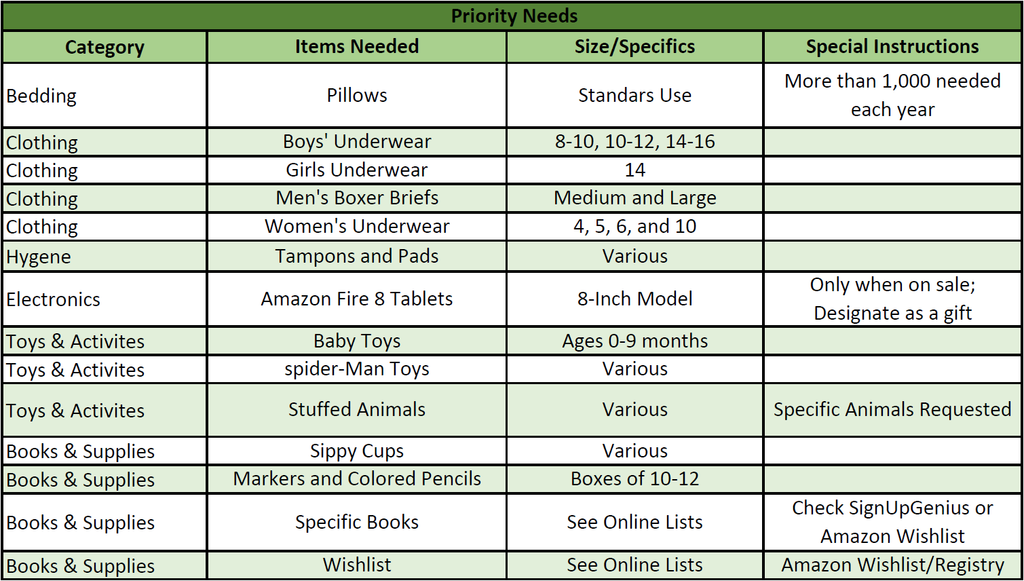
Additionally, ensure the SignUpGenius and Wishlist/Registry links are applicable near this section.
High-Priority New or Gently Used Items: It would be beneficial to make a spreadsheet for this section as well for organization purposes. A screenshot of this list can be added since these items seem to be constant.
3. “What We Do/Do Not Need” Reference:
To reduce repetitive questions and confusion, keep exclusions grouped neatly at the bottom of the list:
- Year Round Needs: Items you deem necessary.
- What We DO NOT Need Year Round: Items you know families do not need unless requested for a specific event.
- Furniture Restrictions: Items you deem unacceptable for those in need.
4. Simplified Programs:
Ensure the program descriptions are concise so donors know exactly where their contributions go:
- Simple Household Needs: Laundry baskets, detergent, toilet paper, paper towels, and small appliances.
- My Birthday Matters: Art supplies/kits, character toys (Batman, Spiderman, Minnie Mouse), sports equipment, and backpacks. Specific Requests are located on our SignUpGenius.
- Uniforms for Excellence: School uniforms (khakis and polo shirts).
- Comfort Kits: 20-inch or larger duffel bags, hygiene items, and men’s flip-flops (sizes L/XL for shower shoes).
- Shoe Them Love: $25 Walmart gift cards or brand-new shoes for schoolchildren.
- Simply Sheltered: Sleeping bags, tents, tarps, camping supplies, coats, new batteries, bus passes, and yard tools.
Leave a Reply